The Hendon Mob Pokio Installation Guide

Installation and verification guide.
This is a guide on how to download and install Pokio’s application.
Down the page, you can also view a simple guide on how to verify your account.
1a. Installation
The easiest way to install the app is to click THIS LINK (from mobile unit) and follow the instructions for installation. The link shall detect if you have Andriod or Iphone and guide you through the installation process. If any problems occur, please follow the steps under paragraph 1b.
Our Club code is: 101895
1b. Installation – alternative solution.
Andriod:

For Andriod users the alternative process of installing is very easy.
Just go to www.pokio.com and click the “download for Andriod” icon (must be done from a phone or tab).
You must agree to download content (the app) from an unknown source. It depends on the phone, but the wording is either “Allow installation from unknown source” or “Install unknown apps“.
There may also be other ways this is written, but choose Pokio and accept.
It is located under Settings and Security. You must accept unknown sources or similar.
Apple / IOS:

The Pokio app cannot be found the normal way in the app store. You must use a version called the “Test Flight”. Follow THIS LINK to install “Test Flight”:
You can view a video called “Pokio Sharing feature” in the comment section of THIS EVENT which will show you how to install Pokio with the “Test Flight”.
NOTE: Must be a member of UnitedPokerClubs on Facebook to view (just apply).
2. Registration process – same for both platforms.
From the downloaded app click “Register”.
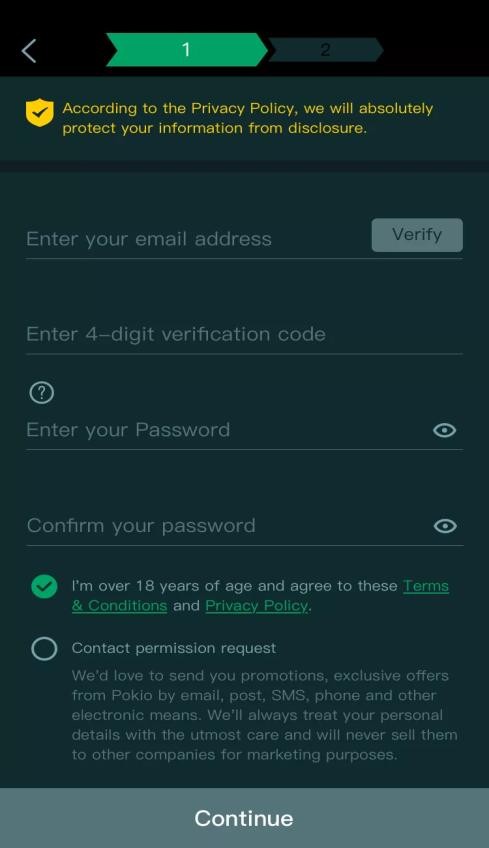
- First fill in your e-mail address and click “verify”. If you get invalid e-mail address you might have an open space somewhere, remove it.
- A 4 digit code will be sent to your email address. Check your spam filters if you don’t find the e-mail. You have 3 minutes to insert the code.
- Choose a password. Password must contain 6-18 characters and contain one capital and one small letter, one number, and one special character (such as $, &, -, @,). You can select other login methods such as fingerprint reader or face recognition later on if your phone supports this.
- Check for “I’m over 18 years”.
- Please check for “contact permission request” so that we can send you good offers. Will not be misused or frequent.
- Click “continue”.
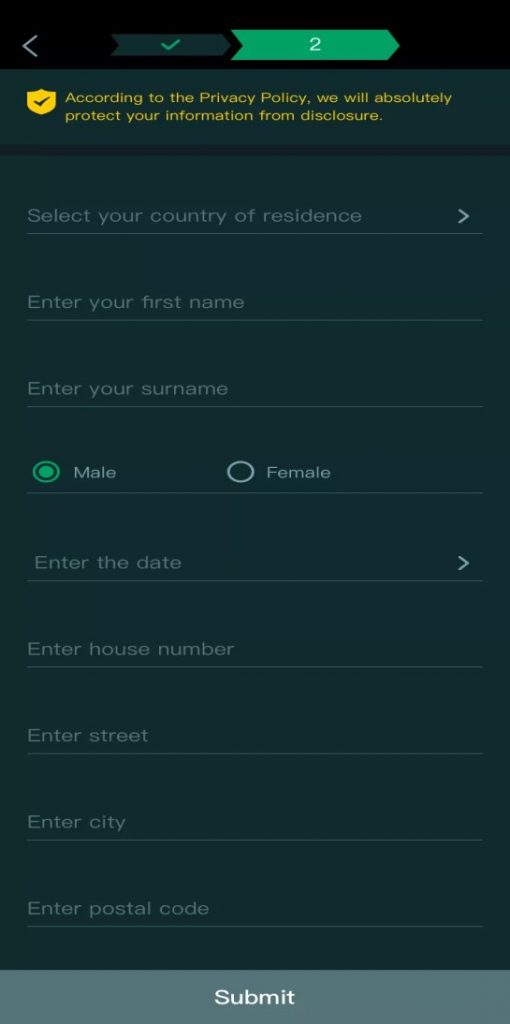
- Fill in your personal information.
- When selecting a country you can use the search bar, write the first two letters, and select.
- Your default username will be your first name. You can change the username from settings later.
- Date = Date of your birthday.
- To avoid problems with deposits and withdraws it is important that all information is accurate and true.
- Click “Submit” when you are done
- A pop-up screen will appear to confirm that all information is true and accurate.
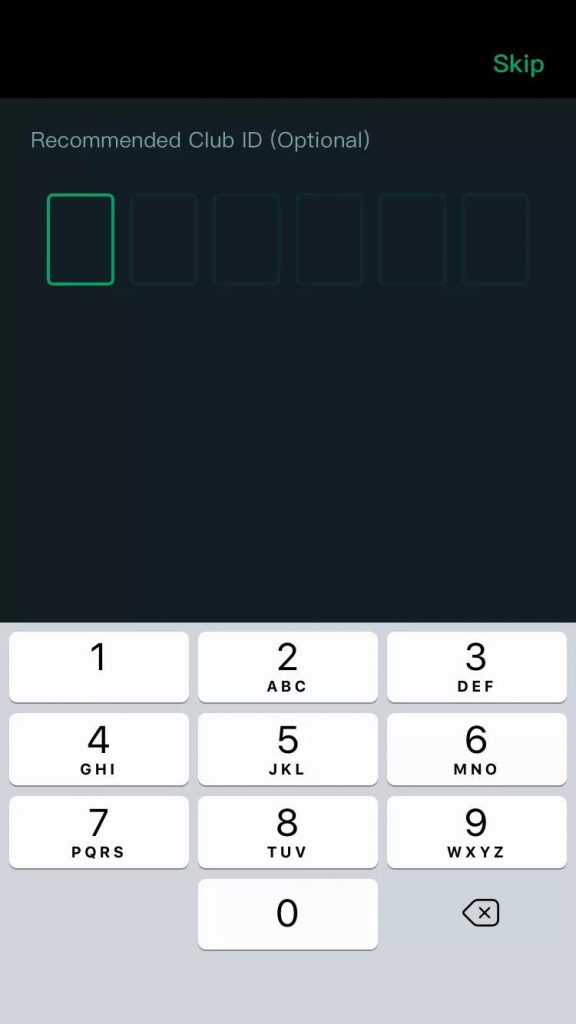
- In the last step, you are asked to input your recommended Club ID , 6 digits.
- The Code for The Hendon Mob is: 101895
- You can use this event for troubleshooting.
Note: Must be a member of UnitedPokerClubs on Facebook to view (just apply).
If you experience any problems contact [email protected] or contact us Facebook Or visit our Webpage
Welcome to The Hendon Mob and Pokio through UnitedPokerClubs
3. Verification
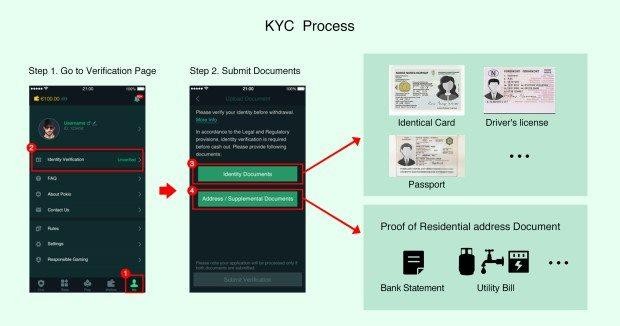
A. In line with licensing requirements, you must verify your account in order to withdraw money or receive rewards. This is done very easily on Pokio. Select “Me” in the bottom right corner.
B. Under “Identity verification” you can upload a photo of your ID and a picture of an invoice with your address on it. Just take the pictures with your phone and upload directly in the app. Confirmation can take up to 24 hours.
Your identification: Valid ID’s: Passport, Driver license and National identification card. (Not Visa/Credit card).
Proof of address: Your proof of address should be a bank statement or any utility bill. These factors are important:
- Must show name, address and date.
- The letter cannot be older than 3 months (the date of the letter).
- Be sure to include all 4 corners of the letter. (Picture of PC screen from your internet bank is ok as long as it is done correctly).
C. United Poker Clubs and associated clubs have no tools or rights to help players with identity verification, deposits or withdraws. For such issues use this email: [email protected] For other issues please use [email protected] or contact us on our facebook page.
Tournament Spotlight
| 31 Aug - 14 Sep 2026 | Australia |   Irish Open International - Sydney, Sydney Irish Open International - Sydney, Sydney |
| 1 - 14 Sep 2026 | France |  WSOP International Circuit - WSOPC Paris, Paris WSOP International Circuit - WSOPC Paris, Paris |
| 10 - 22 Sep 2026 | Liechtenstein | WSOP International Circuit - WSOPC Liechtenstein, Gamprin-Bendern |
| 14 - 20 Sep 2026 | Malta |  The Festival in Malta, St. Julian’s The Festival in Malta, St. Julian’s |
| 15 - 22 Sep 2026 | Estonia |  Diamond Poker Series - PLO Grand Slam Tallinn, Tallinn Diamond Poker Series - PLO Grand Slam Tallinn, Tallinn |
| 17 - 27 Sep 2026 | Cyprus |   Mediterranean Poker Party (MPP), Kyrenia Mediterranean Poker Party (MPP), Kyrenia |
| 17 - 27 Sep 2026 | Belgium | Belgian Poker Challenge - Megastack Edition, Namur |
| 22 - 27 Sep 2026 | France |  Winamax Poker Open, Aix Les Bains Winamax Poker Open, Aix Les Bains |
| 24 Sep - 4 Oct 2026 | Tanzania |  African Poker Championship - APC Tanzania, Dar es Salaam African Poker Championship - APC Tanzania, Dar es Salaam |
| 24 Sep - 5 Oct 2026 | United States | World Series of Poker - WSOPC California, Lincoln |
| 25 Sep - 5 Oct 2026 | Malta | WSOP International Circuit - WSOPC Malta, St Julian's |
| 25 Sep - 7 Oct 2026 | South Korea |  Asian Poker Tour - APT Jeju 2026, Jeju Asian Poker Tour - APT Jeju 2026, Jeju |
| 25 Sep - 8 Oct 2026 | United States |   PokerGO Tour - PGT 2026 Poker Masters, Las Vegas PokerGO Tour - PGT 2026 Poker Masters, Las Vegas |
| 5 - 11 Oct 2026 | Spain |  The PartyPoker Tour - Castellon, Castellon The PartyPoker Tour - Castellon, Castellon |
| 8 - 18 Oct 2026 | England |  888poker LIVE - London, London 888poker LIVE - London, London |
| 9 - 10 Oct 2026 | United States | PokerGO Tour x PGT Invitational, Las Vegas |
| 10 - 21 Oct 2026 | South Korea |  KPC Poker Series October 2026, Jeju KPC Poker Series October 2026, Jeju |
| 11 - 19 Oct 2026 | Italy |  La Notte Degli Assi €1 Million, Venice La Notte Degli Assi €1 Million, Venice |
| 12 - 14 Oct 2026 | United States |  PokerGO Tour - Super High Roller Bowl XI, Las Vegas PokerGO Tour - Super High Roller Bowl XI, Las Vegas |
| 23 Oct - 3 Nov 2026 | Malta |   2026 Malta Poker Festival (MPF) (THMC), St. Julian’s 2026 Malta Poker Festival (MPF) (THMC), St. Julian’s |
| 27 Oct - 4 Nov 2026 | Malta | Battle of Malta 2026 - Autumn Edition, St Julian's |
| 28 Oct - 8 Nov 2026 | South Africa |  Montecasino SA Poker Open & THMC SA Millions 2026, Johannesburg Montecasino SA Poker Open & THMC SA Millions 2026, Johannesburg |
| 28 Oct - 11 Nov 2026 | South Korea |   Jeju Poker Festival 2026 ft. RDPT & KPC Poker, Jeju Jeju Poker Festival 2026 ft. RDPT & KPC Poker, Jeju |
| 30 Oct - 9 Nov 2026 | South Korea |  World Poker Tour - WPT Seoul, Incheon World Poker Tour - WPT Seoul, Incheon |
| 10 - 15 Nov 2026 | Morocco |  Irish Open International - Marrakech, Marrakech Irish Open International - Marrakech, Marrakech |
| 20 - 29 Nov 2026 | Estonia | The Festival in Tallinn, Tallinn |